Coming soon · iOS and Android

Stubborn about getting it done.

Ok Donkey is a cheerful mobile app for the jobs that have to happen on time. You set the task, it raises an alarm-style alert, and it happily keeps going until someone marks it done.

The school run, medicine, the bins, the laundry. An exact time, or a window during the day. One event, the people who share it, and a nag that stays with the job.

  • A live alert at the set time, or at the end of a daytime window
  • Shared with the people who have accepted the event
  • Closed for everyone when one person taps Done
  • Skip one occurrence of a repeat, and keep the next one
App Store Google Play
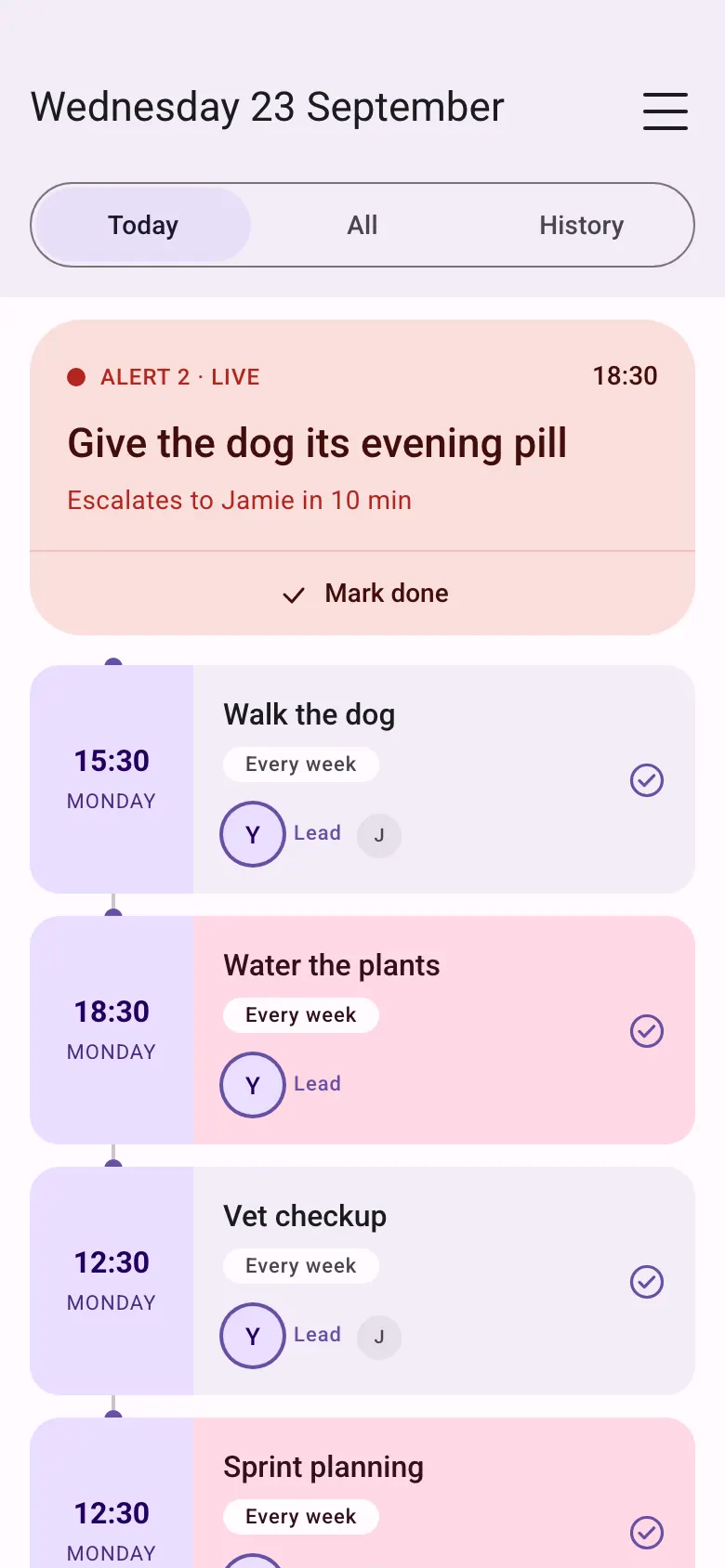
Today. A live alert for the dog’s evening pill at 18:30 escalates to Jamie in 10 minutes. Upcoming tasks show the lead and a backup.
Today — what is live, what is coming up, and whose turn it is.

How it works

Create the event, decide who is nagged first, then let the alert do the chasing. See a full day with a dog’s heart medicine.

  1. Create the event

    Give it a name, an optional photo, and a time. Exact, or during the day. Once, or on a repeat: every few hours, every day, weekdays, weekends, or chosen days.

  2. Choose who goes first

    Invite people by email. They accept before the alarm includes them. One person is nagged first. If they have not marked it done, everyone else is alerted after the wait you set.

  3. Get the alert

    At an exact time, or at the deadline of a daytime event, the phone raises a reminder and re-alerts every 2 minutes. It stays up until the task is finished, skipped, or missed.

  4. Mark it done

    One tap closes that time for the whole group. On a repeat you can skip this one time instead. The next time stays on the clock.

What the app actually does

One function, carried through. Ok Donkey creates an event, nags until it is done, and escalates if the first person does not finish it.

Events

  • A title, an optional photo, and a start date. A short note if you need one.
  • Exact time. The alarm starts at that time. You can mark it done from 15 minutes before.
  • During the day. It is visible from a time you choose, for example 08:00, and the list stays quiet. If it is still open at the deadline, the alarm starts then. Marking it done during the window means that alarm does not start.
  • One-off, or repeating — every few hours, daily, weekdays, weekends, or on chosen days.
  • Today, All, and a history of the last 14 days, grouped by week or by month.

The nag

  • At the trigger time, an alarm-style alert on the phone of the person whose turn it is.
  • It re-alerts every 2 minutes, and the screen shows how many alerts have fired.
  • The nag stops after 30 minutes, or sooner if the next time of the same event would start before that. That time is then missed, and everyone who has joined gets an email.
  • Anyone who has accepted the event can tap Mark done. That closes it for the group.
  • On a repeat, Skip this time closes only that occurrence. A one-off cannot be skipped. A missed time cannot be marked done.
  • Your own alarm is scheduled on the phone. Telling someone else’s phone needs a connection. On iPhone, Focus, Silent, and Do Not Disturb can hide the sound.

People and escalation

  • Invite by email. Until they accept, under Menu then Invites, the event shows as not accepted yet. It does not alarm for them.
  • A new event waits 8 minutes. You can choose 5, 8, 10, 15, or 30 minutes under Escalate after.
  • When that wait ends and the time is still open, everyone except the first person is nudged. You cannot nudge them early.
  • Same person. The lead is nagged first every time.
  • With no lead, pick Take turns or Whoever usually finishes first.
  • By day is for repeating events. Each weekday can name one person. An empty day uses the same-person rule. After the first nudge, the row says Everyone.

Getting started

  • Sign in with your email and a one-time code. There is no password. We keep only what the reminder needs, in an EU datacentre. No advertising, no tracking, and we do not sell your data.
  • Notifications are required. Without them the alarm cannot do its job.
  • Help, invites, terms, and the privacy policy sit in the menu.
  • A one-off can be undone. A repeat can be undone until an hour after its deadline. Skip is final for that one time.

Screens

Today, a daytime window, the live alarm, and the help that explains the rules. These are the current app screens.

Today. A live alert for the dog’s evening pill, then upcoming walks, plants, and a vet checkup, each showing who is lead.
Today Live, upcoming, missed, skipped, and done.
During the day. The event is visible from 08:00 and the deadline is 20:00. It repeats every day.
During the day Quiet until the deadline, unless you mark it done.
Active reminder for the dog’s evening pill. Alert 2, re-alerting every 2 minutes, with Skip this time and Mark done.
Live alarm It stays up, and re-alerts, until it is done or skipped.
History of the last 14 days, grouped this week, with who marked each task done.
History The last 14 days, by week or by month.
Edit event at an exact time of 18:30, repeating every 6 hours, re-alert every 2 minutes, escalate after 8 minutes.
Exact time A clock time, a repeat, and how long to wait before everyone else.
Menu with Account, one pending invite, online status, Help, terms, and the privacy policy.
Menu Invites, help, and the privacy policy.
Help. When you can mark a task done, for an exact time and during the day, and what you cannot undo.
Help When a time opens, who is nagged first, and what skip does.
Welcome screen. Sign in with an email address for a one-time code. A note explains that only the email is stored, with no tracking or location, in an EU datacentre.
Welcome Email and a one-time code. Nothing else is stored.

Good for the jobs that slip

The same stubborn alert, for the household tasks people actually search for.

The school run

Set pickup as an exact time, name who goes first, and let the alert stay up until a grown-up marks the children collected.

Medicine on time

A dose at 09:00 and 21:00, or a daytime window if it can happen any time before a deadline. One tap closes it for the group. It is a reminder, not a medical device. See it with heart medicine for the dog.

Bin night

The reminder that will not quietly sit on the lock screen while the lorry goes past. If this week was already done, skip that one time.

The laundry

Put it on, move it over, take it out. A repeating event, and a turn if it should not always be the same person.

Flatmates and friends

Not only families. Anyone who accepts the invite can be on the event, and one Done tells the rest it is handled.

Questions

Short answers. The longer comparison sits with the other apps.

Do you collect or sell my data?

Our only interest is helping you get the job done. We keep only what the reminder needs: your email, the event, and who is on it. We do not advertise, we do not track you, and we do not sell or share your data for marketing. The people on an event can see that event. The privacy policy lists every field.

What does Ok Donkey do?

You create an event for an exact time, or for a window during the day. At an exact time the phone raises an alarm-style alert and re-alerts every 2 minutes until someone marks it done, skips that time, or the nag stops. A daytime event stays quiet until its deadline. One tap closes it for everyone on the event.

When can a task be marked done?

Creating an event does not open it. An exact time can be marked done from 15 minutes before. A daytime window can be marked done from the moment it opens, for example 08:00, and the alarm only starts at the deadline if it is still open. Before it is open, the app tells you to wait.

Who can share an event?

The people who do the job with you: family, a co-parent, flatmates, or friends. Invite them by email. They accept under Menu, then Invites. Until they accept, the event does not alarm for them. One person can be nagged first, you can take turns, follow whoever usually finishes first, or give each day to a different person.

What if nobody marks it done?

The nag stops after 30 minutes, or sooner if the next time of the same event would start before that. That time is then missed, and everyone who has joined gets an email. A missed time cannot be marked done. If the event repeats, the next time is already on the list.

What does it leave out?

Chat, a calendar, points, meals, and location. Ok Donkey is the alert, the people on it, and the tap that closes it. If you want the family organiser as well, the comparison says when another app is the better fit.

How is it different from a normal reminder?

A normal reminder fires once. Ok Donkey keeps going until the job is done, and it calls in everyone else if the first person does not finish it. See it next to GetNotify, Cozi, Sweepy, Nipto, FamilyWall, Maple, and Apple Reminders.

App Store Google Play