One moment for everyone
A reminder rings on the clock of its own time zone, for everyone on it. Nobody gets a different alarm from the others.
A reminder rings at one moment for everyone on it. Smart Timezones makes that moment make sense on every clock: each person sees their own time, the owner is asked only when it would wake someone up, and travel or a holiday does not leave a shared job unanswered.
Anna in Brussels sets a reminder. Pick the time, where a friend joins from, and what Anna chooses when she is asked. You can also send the friend on holiday.
Marc has a reminder at 10:00 Brussels time, only for him, and lands in Singapore. What happens?
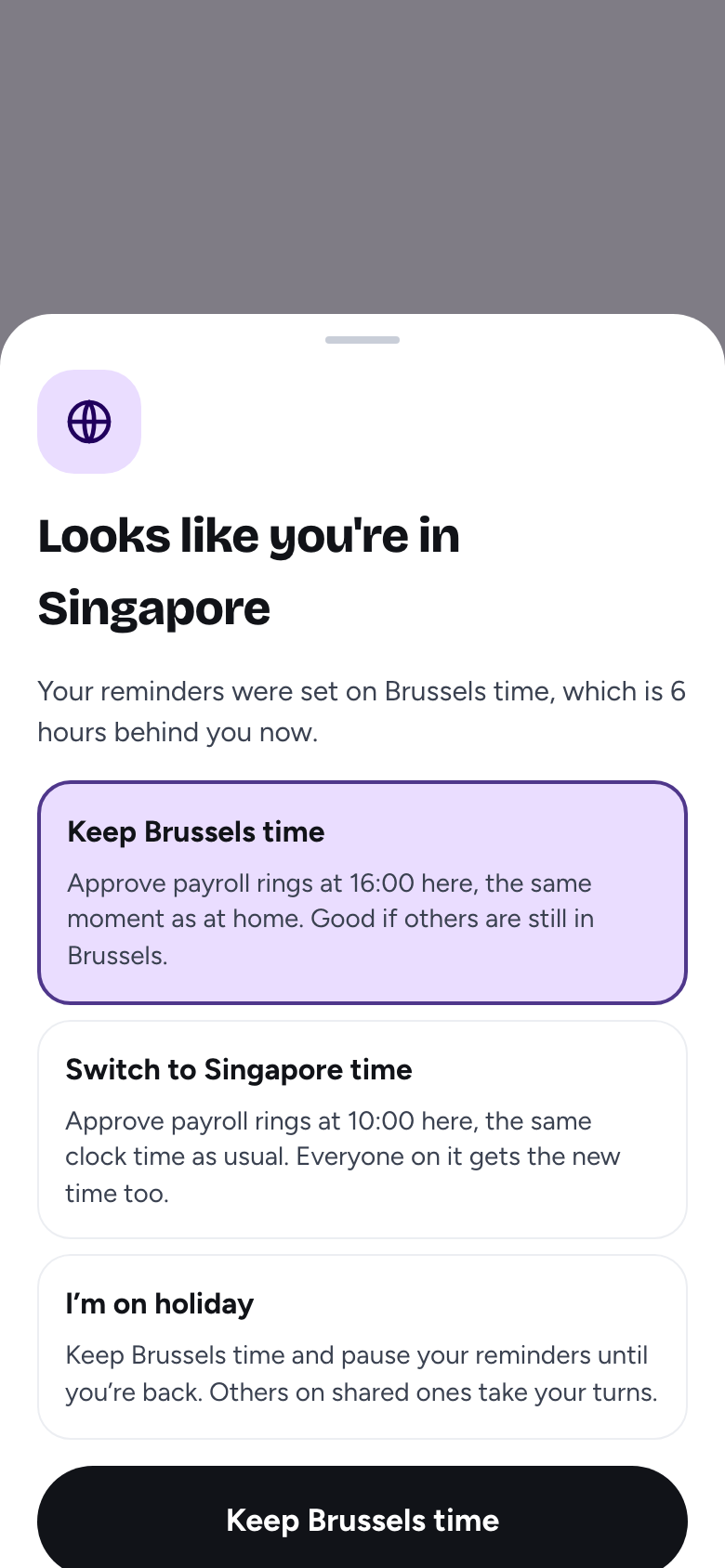
The app asks once: keep Brussels time (it rings at 16:00 in Singapore), switch to Singapore time (10:00 there), or start a holiday. A shared reminder warns that moving it changes the time for everyone.
The rules
Everything else on this page follows from these.
A reminder rings on the clock of its own time zone, for everyone on it. Nobody gets a different alarm from the others.
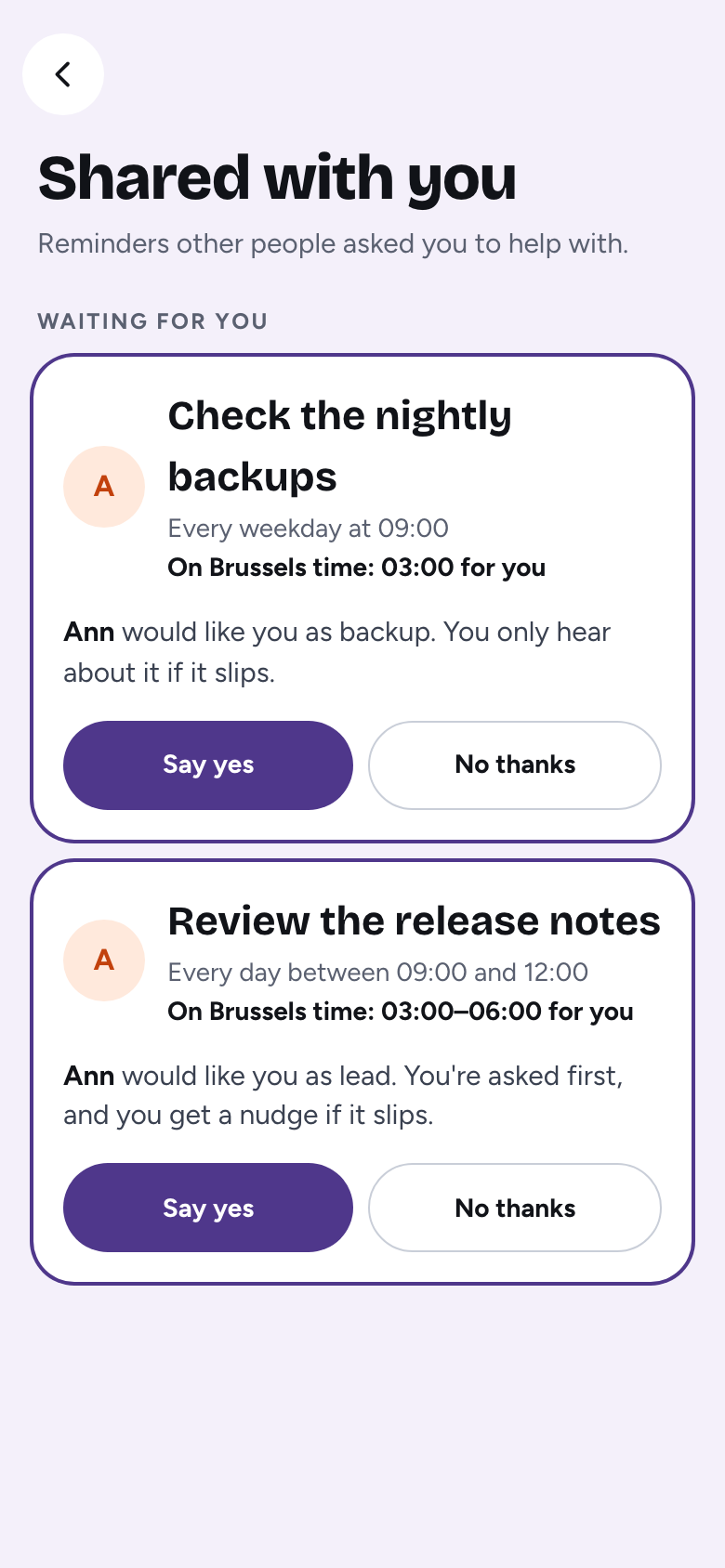
Each row shows when it rings on your clock, such as “03:00 for you”, and the owner sees “03:00 for Tom”.
When it would ring between 22:00 and 07:00 for someone, the owner gets one question: keep the time, or change it. Any other gap is shown, never asked.
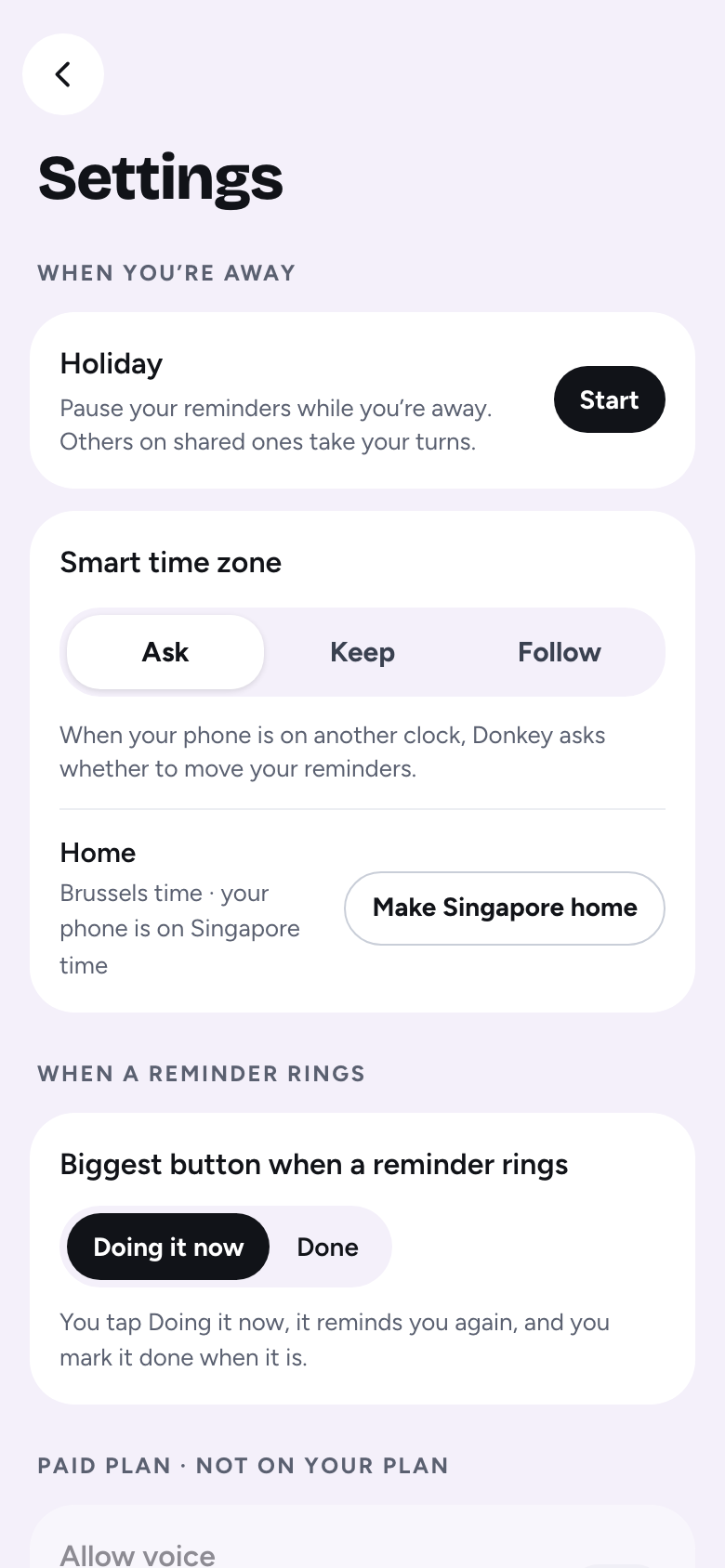
Ask, Keep or Follow, in Settings. Ask checks with you when you travel. Keep never asks. Follow moves the reminders only you are on by itself, and still asks about shared ones.
Every case, explained
Nothing is shown and nothing is asked. Smart Timezones stays out of the way until a clock differs.
Anna sets the school pick-up call for 15:00 in Brussels and invites Tom in Toronto. The invite shows “09:00 for you”. It is daytime for Tom, so nobody is asked. He sees his own time and that is all.
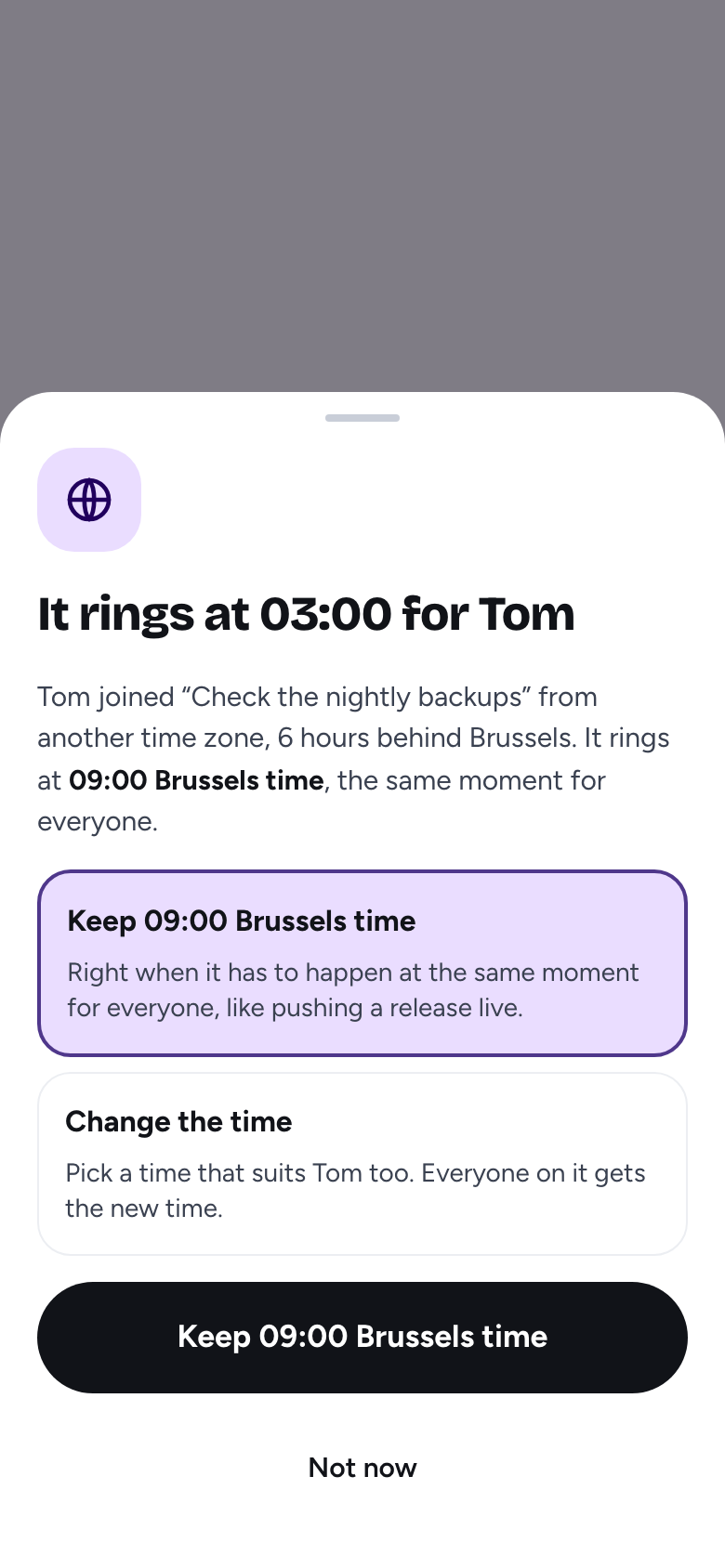
Anna sets “Check the nightly backups” for 09:00 Brussels time, and Tom joins from Toronto, where it is 03:00. Anna gets one push and one card on Today: “It rings at 03:00 for Tom”. She can keep 09:00 Brussels time, for a job that must happen at the same moment for everyone, or change the time to one that suits Tom too. It is asked once per person per event, and changing the time answers it too. Tom sees “On Brussels time: 03:00 for you” on his invite either way.
Emma is in London, one hour behind Brussels. A 15:00 reminder shows “14:00 for you”. Nobody is asked. Only a ring that lands between 22:00 and 07:00 on her clock starts a question.
Marc lands in Singapore. The app asks once: move his reminders to Singapore time, or keep Brussels time. If a shared reminder is among them, the question names it and says that moving it changes the time for everyone on it. After Keep, the Today card says “Your reminders stay on Brussels time”, and the choice is kept on the server, so his tablet does not ask again.
Lisa flies to Tokyo. The Sunday call is now Monday morning for her, and her row says so (“Monday 08:00”). Lisa is never asked to move it, because it is not hers to move. The owner is only asked if it would ring at night for her.
The team goes to New York. The stand-up is offered a move to New York time, and moving keeps its clock time: 09:00 stays 09:00, now in the new zone.
Priya has not signed up. As soon as her phone reports its zone, her invite shows the time on her clock. A zone that arrives just after she says yes still gets checked against the night rule.
Europe changes its clocks a week before North America does. The 17:00 reminder in Brussels keeps ringing at 17:00 Brussels on both sides of the change. What Tom sees moves from 11:00 to 12:00 for the week between, then back to 11:00. You do nothing.
A reminder done any time before a deadline shows the whole window on your clock, such as “03:00–06:00”. The night rule applies to both ends of it.
Tuesday is Tom’s turn for the payroll check, and it rings at 02:00 his time. The owner is asked, once. If Tom is on holiday that Tuesday, Ann takes the turn.
With Follow, reminders only you are on move to the phone’s clock by themselves when you land. Shared ones still ask first, because moving them changes the time for other people. Home is the first zone your phone reported, and you can change it in Settings.
Holiday
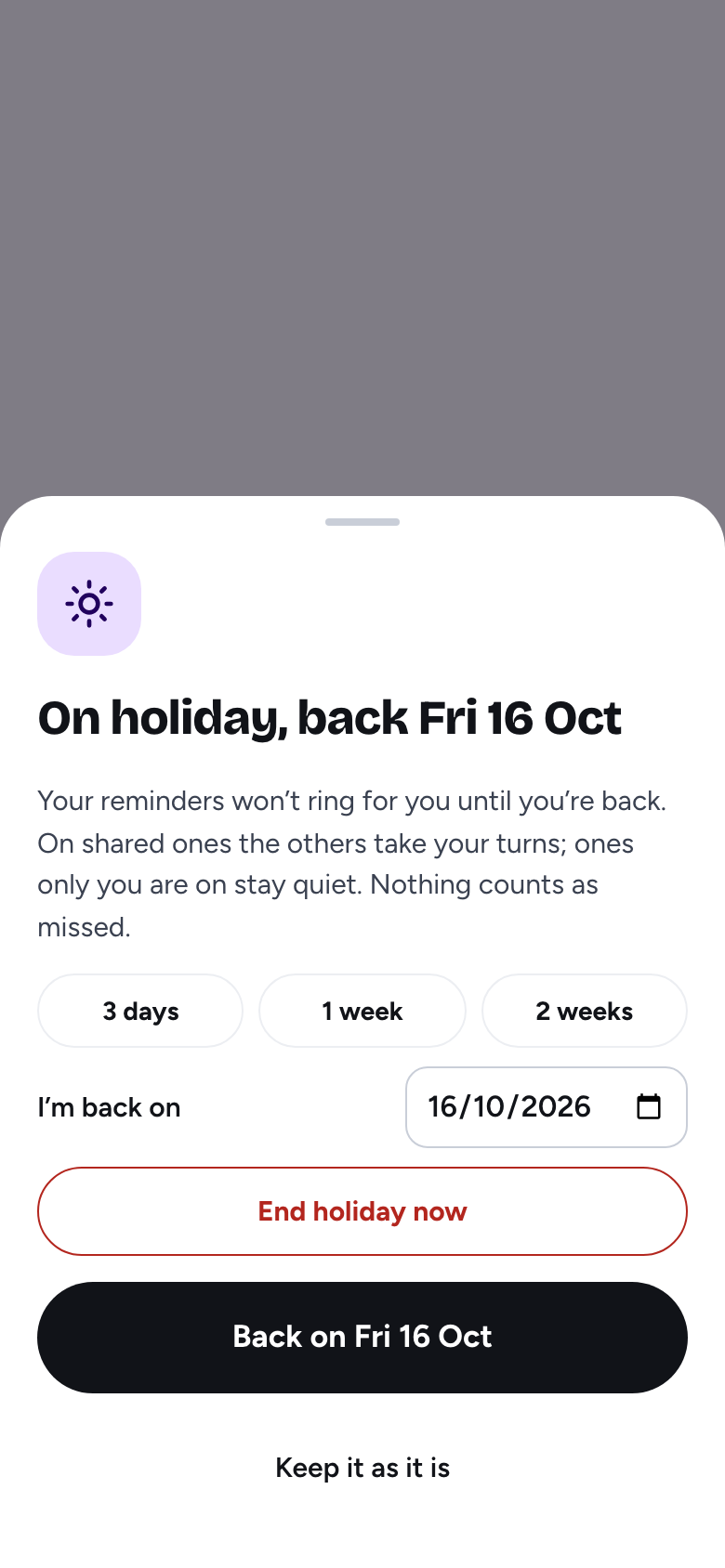
Being on another clock is one thing. Being away is another. Set a holiday from the menu or from the travel question: 3 days, 1 week, 2 weeks, or a date up to 90 days ahead.
Until you are back, you are left out of the turns, the nudges, the hand-offs and the missed emails, on every phone. Others on shared reminders take your turns. A reminder only you are on stays quiet, and is not counted as missed. The people on your reminders see “away, back 18 Oct”. Ending early keeps the days you were already away.
If every person on a shared reminder is on holiday at the same time, nobody would be reminded. The owner gets one push and one email for that stretch, and a card on Today until it is over or dismissed. A reminder only one person is on is paused on purpose, and never counts.
While you are on holiday or away from home, Today shows what was chosen: “Your reminders stay on Brussels time”, “moved to Singapore time”, or a mix. It disappears when the holiday is over and the phone is back on the home clock.
Emails and privacy
Missed and nudge emails add “(03:00 your time)” for anyone on another clock. Only that clock time leaves our server. Nobody’s time zone is shown to the others.
FAQ
Smart Timezones is how Ok Donkey handles people on different clocks. A shared reminder rings at one moment for everyone on it, on the clock of its own time zone. Each person sees when it rings on their own clock, such as “03:00 for you”. The owner is asked only when it would ring at night for someone, between 22:00 and 07:00 on their clock. Travel and holidays are handled too.
A shared job has one real moment: the bin lorry, the call, the medicine. Ok Donkey rings it at that moment for everyone, and tells each person what time it is for them.
A 09:00 call in Toronto that is 15:00 in Brussels suits both, and asking about every gap would be noise. Night, from 22:00 until 07:00 on someone’s clock, is when a ring does harm. The owner then gets one question: keep the time, or change it.
They are the three choices of the Smart time zone setting. Ask checks with you when your phone is on another clock: keep home time, switch to local time, or start a holiday. Keep never asks. Follow moves the reminders only you are on to the phone’s clock by itself, and still asks about shared ones, because moving them changes the time for everyone on them.
Yes, and the app tells you so before you confirm.
No. Only the clock time leaves the server, such as “03:00 for Tom”. Nobody’s time zone is shown to the others.
Until you are back you are left out of the turns, the nudges, the hand-offs and the missed emails, on every phone. Others on shared reminders take your turns. A reminder only you are on stays quiet and is not counted as missed. You can set 3 days, 1 week, 2 weeks, or a date up to 90 days ahead. If everyone on a shared reminder is away at once, the owner is told once.